load(file = "prams1to3_filteredvars.RData")1.3.6: Putting Reproducible Research Principles Into Practice
(In Person)
Session Objectives
- Discuss reproducible research principles.
- Apply reproducible research principles to data analysis using R Markdown.
Key points that will be covered:
- Reproducible research principles
- What is R Markdown
- How to create a report using R Markdown
- Customize the layout of presentations or reports
- Insert and create objects, such as tables, images, or videos, within a document
In Person - Summer 2026
During the in person session we will work through creating and using Rmarkdown to combine report text, R code and output seamlessly to create reproducible analysis reports.
For this section, we will be working with a subset of the PRAMS Dataset.
PRAMS Subset
Variables Subset
Specifically, we will be focused on these variables:
- Year of Birth
YY4_DOB
-
IPV(YES if any of these were TRUE/YES)-
PAB6HUS: (28a) Abuse – 12 mnths before preg, husb/part -
PAB_XHUS: (28b) 12 mnths before preg, ex-h/p -
PAD6HUS: PAD6HUS (29a) Abuse –during preg, h/p -
PAD_XHUS: (29b) Abuse – during preg, ex-h/p
-
- Demographic Factor (Predictors)
-
HISPANIC: Hispanic ethnic grp -
MAT_RACE_PU: Maternal race grp MAT_AGE_PUMARRIED
-
- Socioeconomic Factor (Predictors)
-
INSNONE: (9k) I did not have any health insurance during the month before I got pregnant -
PP_NONE: I did not have any health insurance to pay for my prenatal care -
MAT_DEG: Maternal highest degree received -
MAT_WIC: Mother get WIC food during pregnancy?
-
- Psychosocial Factor (Predictors)
-
BPG_DEPRS8: Depression before pregnancy -
MH_PGDX8: Depression during pregnancy
-
- Behavioral Factor (Predictors)
-
PGINTENT: (12) Preg – intention -
CIG_1TRI: No. of cigarettes smoked daily -1st trimester -
CIG_2TRI: No. of cigarettes smoked daily -2nd trimester -
CIG_3TRI: No. of cigarettes smoked daily -3rd trimester -
CIG_PRIOR: No. of cigarettes smoked daily - prior to preg
-
- Medical Factor (Predictors)
-
OTH_TERM: No. of previous other pregnancy outcomes -
MM_NOMD: No medical risk factors?
-
- Healthcare Factor (Predictors)
-
TYP_INJR: (7d) Health care type–visit for injury -
PRE_ABUS: (8i) Pre-preg –hurt emotional/physical -
PRE_MHDP: (8j) Pre-preg –feeling down/depressed
-
- Prenatal Care (Predictors)
-
KOTELCHUCK: Kotelchuck Index -
ASK_ABUS: (14e) HCW ask – hurt emotional/physical -
ASK_DPRS: (14f) HCW ask – if down/depressed
-
- Others
-
STATE: State Name NEST_YRVITAMIN
-
Samples Subset
We also selected 1000 subjects at random who had IPV = YES and 3000 subjects at random who were IPV = NO.
We will use this PRAMS subset prams1to3_filteredvars.RData which has these 4000 subjects for these 28 variables. For each of the Rmarkdown examples, we will load prams13f into your computing “Environment”.
Also download Codebook for PRAMS IPV Subset
RMarkdown Intro
Create and “Knit” your first Rmarkdown “report”
Create a new Rmarkdown File
Let’s take a look at an Rmarkdown file and how we can use it to create a report that combines together data + code + documentation to produce a seamless report.
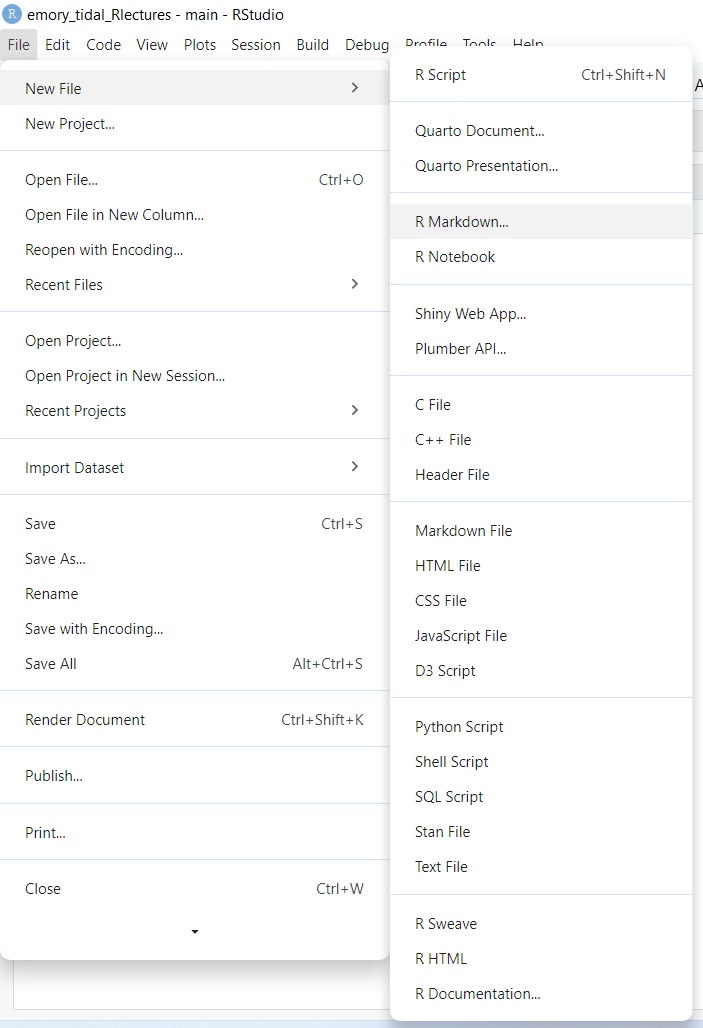
Go to the RStudio menu and click “File/New File/R Markdown”:
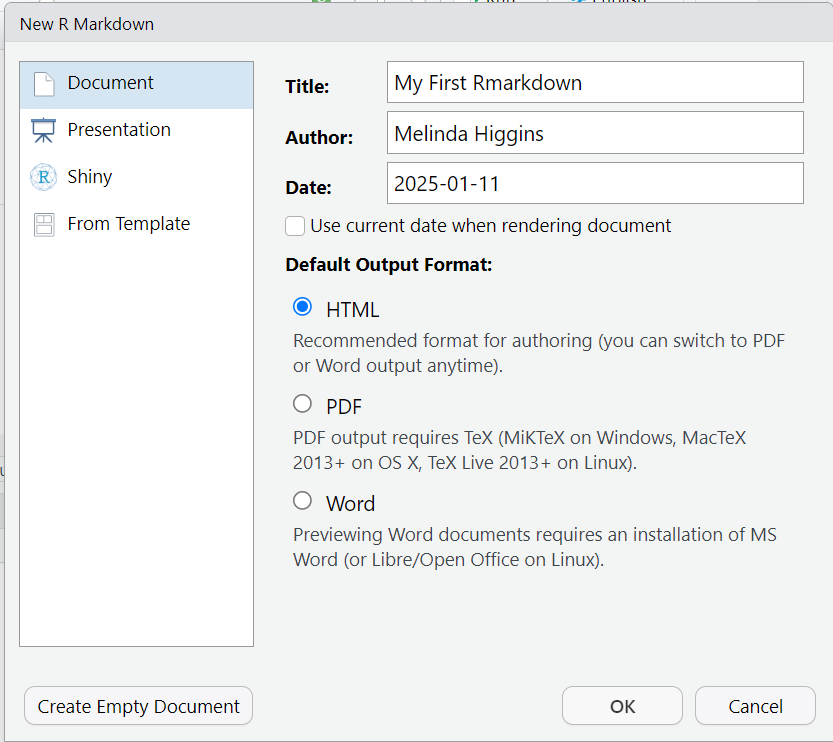
Type in a title, your name, the date and choose the format you’d like to create. For your first document I encourage you to try HTML. But you can create WORD (DOC) documents and even PDFs. In addition to documents, you can also create slide deck presentations, Shiny apps and other custom products like R packages, websites, books, dashboards and many more.
Rmarkdown ideas and inspiration
To get started, use the built-in template:
- Type in a title
- Type in your name as author
- Choose and output document format
- HTML is always a good place to start - only need a browser to read the output
*.htmlfile. - DOC usually works OK - but you need MS Word or Open Office installed on your computer.
- PDF NOTE: You need a TEX compiler on your computer - Learn about installing the
tinytexhttps://yihui.org/tinytex/ R package to create PDFs.
- HTML is always a good place to start - only need a browser to read the output
Rmarkdown sections
Here is the Example RMarkdown Template provided by RStudio to help you get started with your first Rmarkdown document.
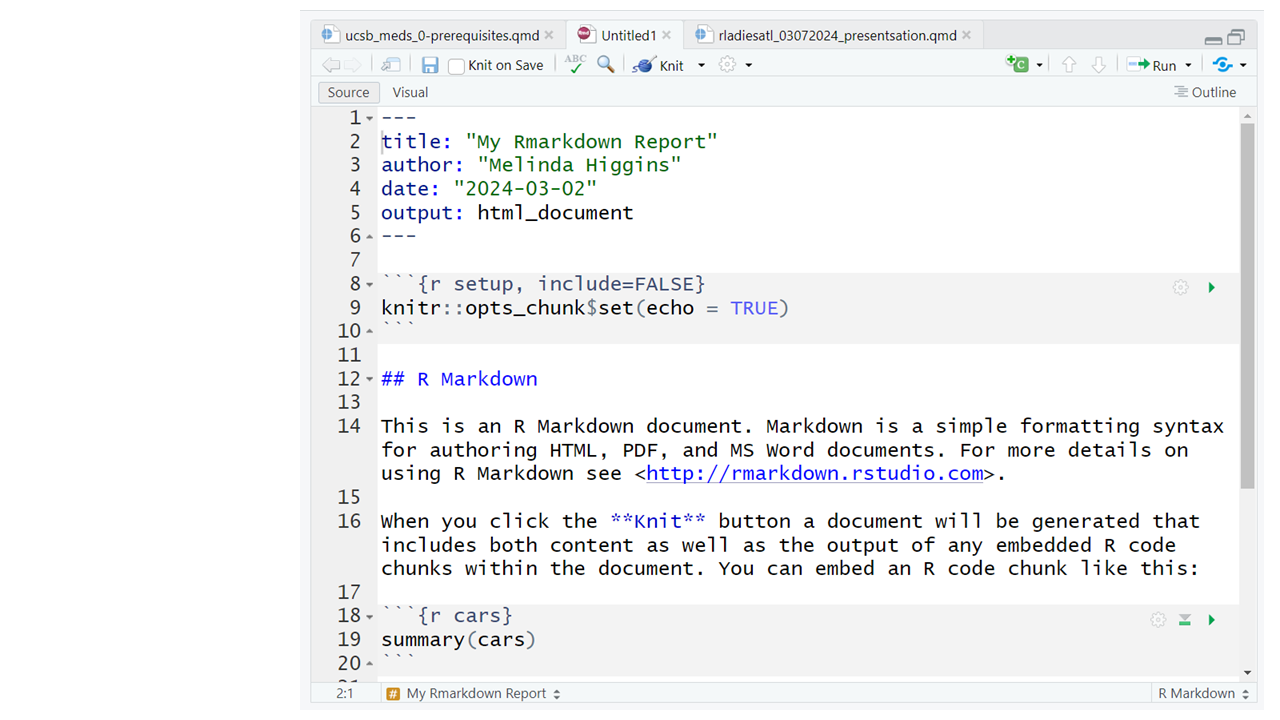
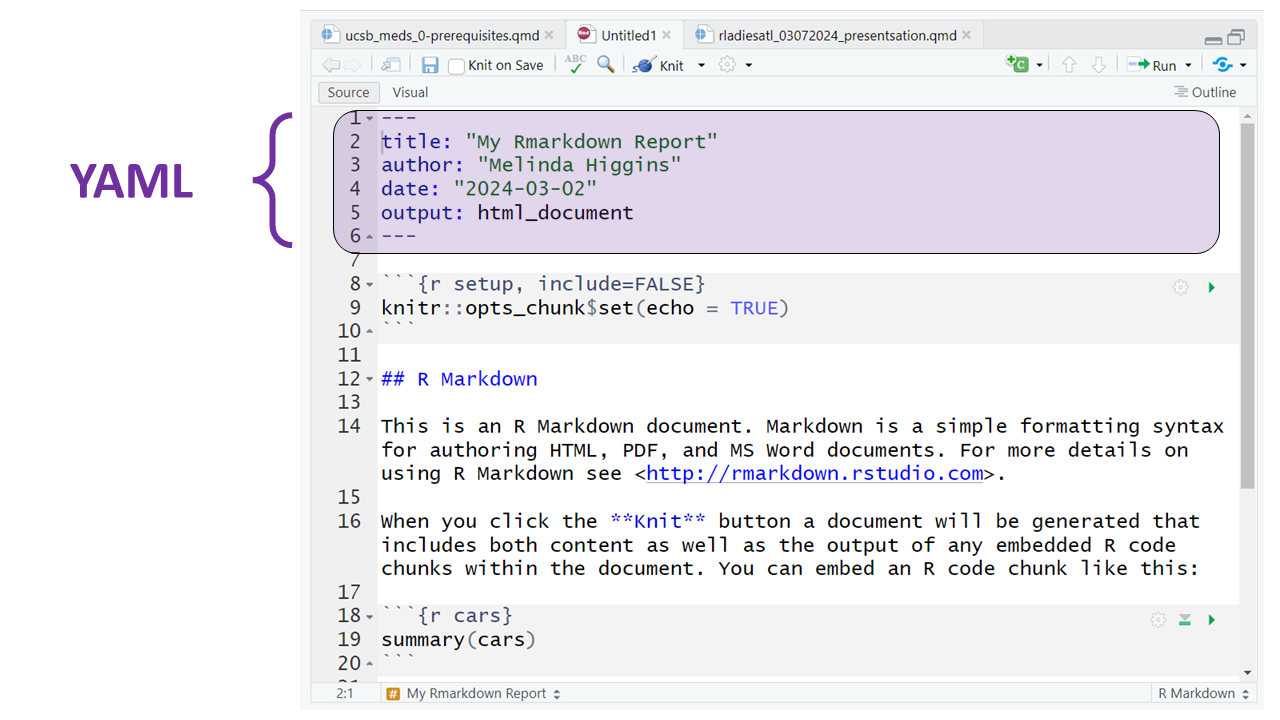
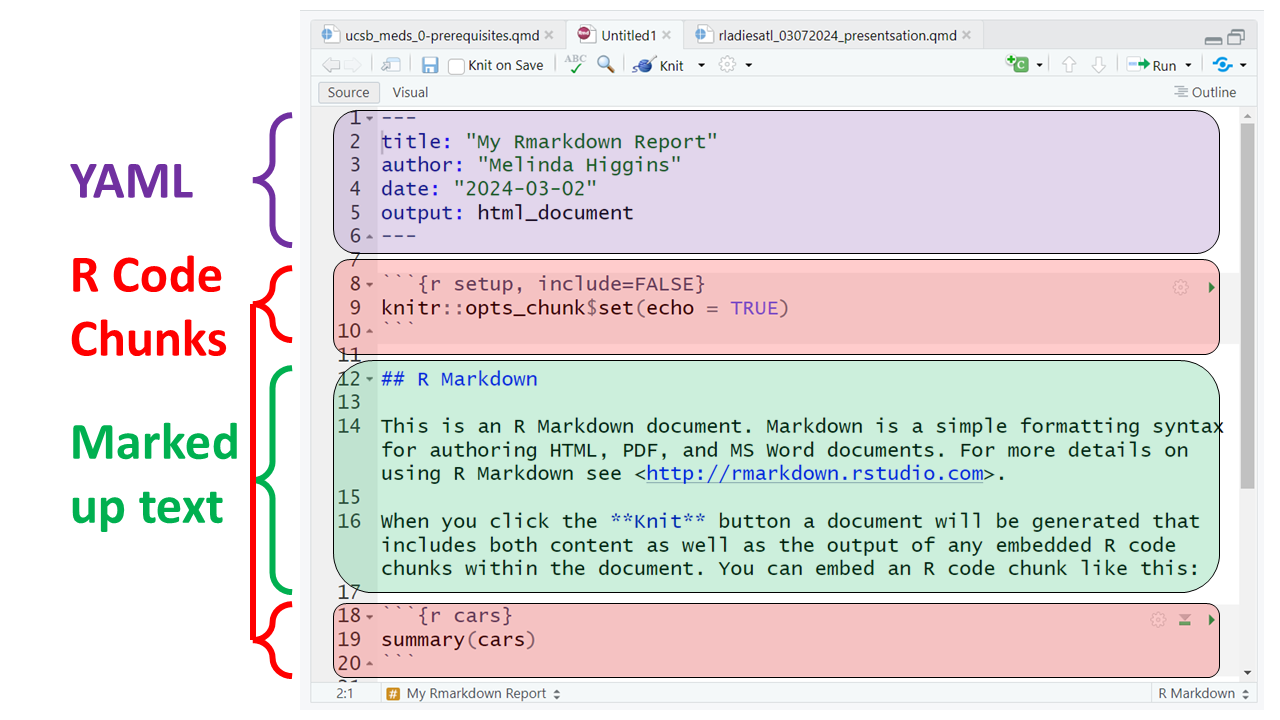
This document consists of the following 3 key sections:
- YAML (yet another markup language) - this is essentially the metadata for your document and defines elements like the title, author, date and type of output document to be created (HTML in this example).
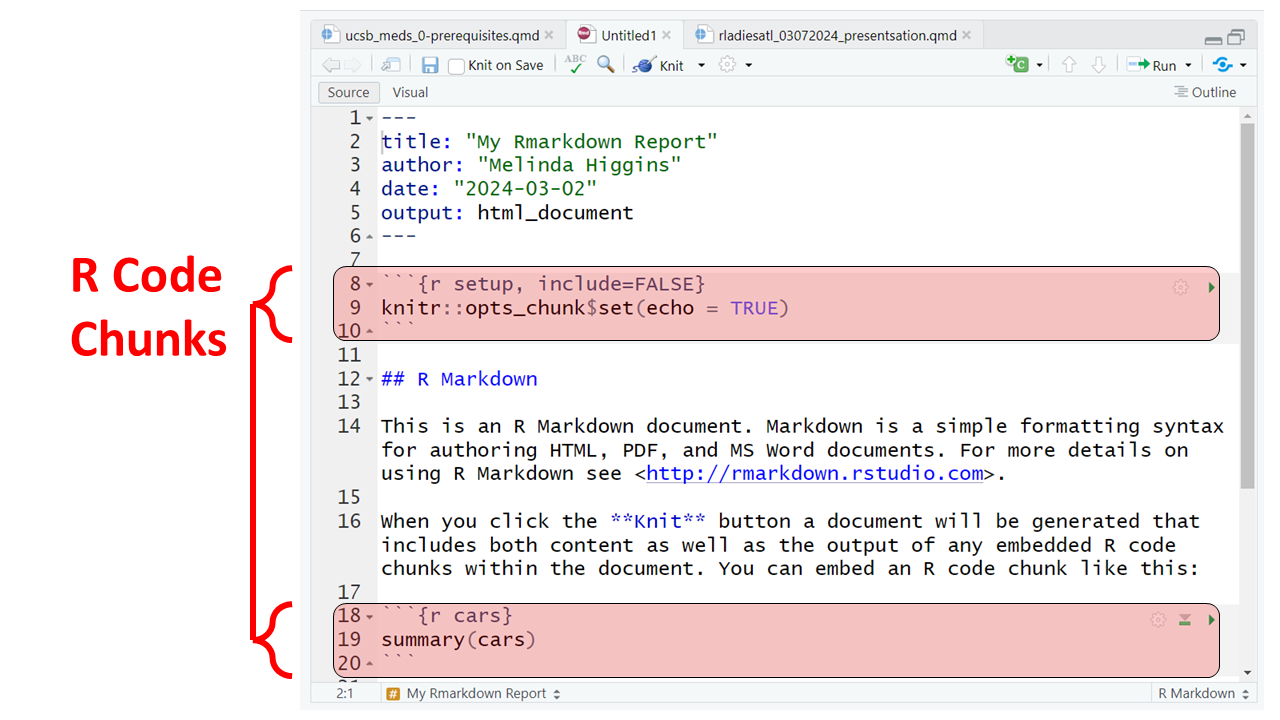
- R code blocks - the goal is to “interweave” code and documentation so these 2 elements live together. That way the analysis output and any associated tables or figures are updated automatically without having to cut-and-paste from other applications into your document - which is time consuming and prone to human errors.
Notice that the code block starts and ends with 3 backticks ``` and includes the {r} R language designation inside the curly braces.
Rmarkdown
Rmarkdown can be used for many different programming languages including python, sas, and more, see rmarkdown - language-engines.
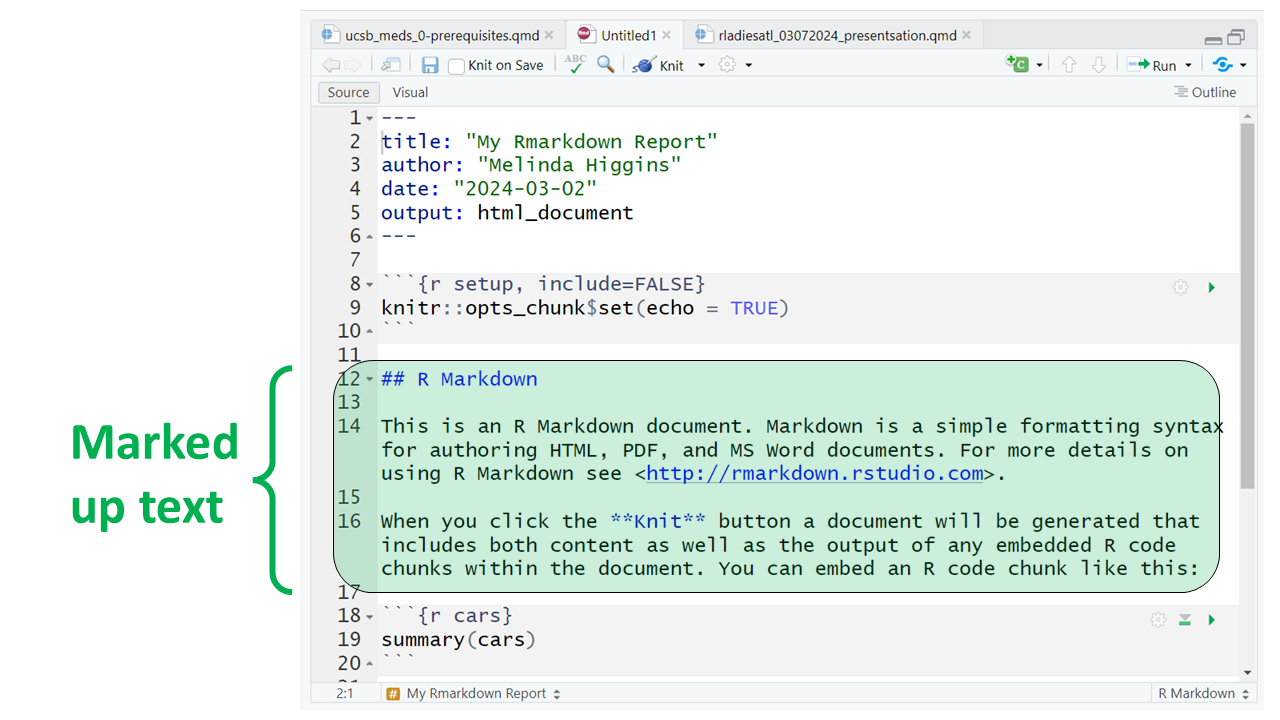
- Along with the R code blocks, we can also create our document with “marked up (or marked down)” text. Rmarkdown is a version of “markdown” which is a simplified set of tags that tell the computer how you want a piece of text formatted.
For example putting 2 asterisks ** before and after a word will make it bold, putting one _ underscore before and after a word will make the word italics; one or more hashtags # indicate a header at certain levels, e.g. 2 hashtags ## indicate a header level 2.
Rmarkdown Tutorial
I encourage you to go through the step by step tutorial at https://rmarkdown.rstudio.com/lesson-1.html.
Here are all 3 sections outlined.
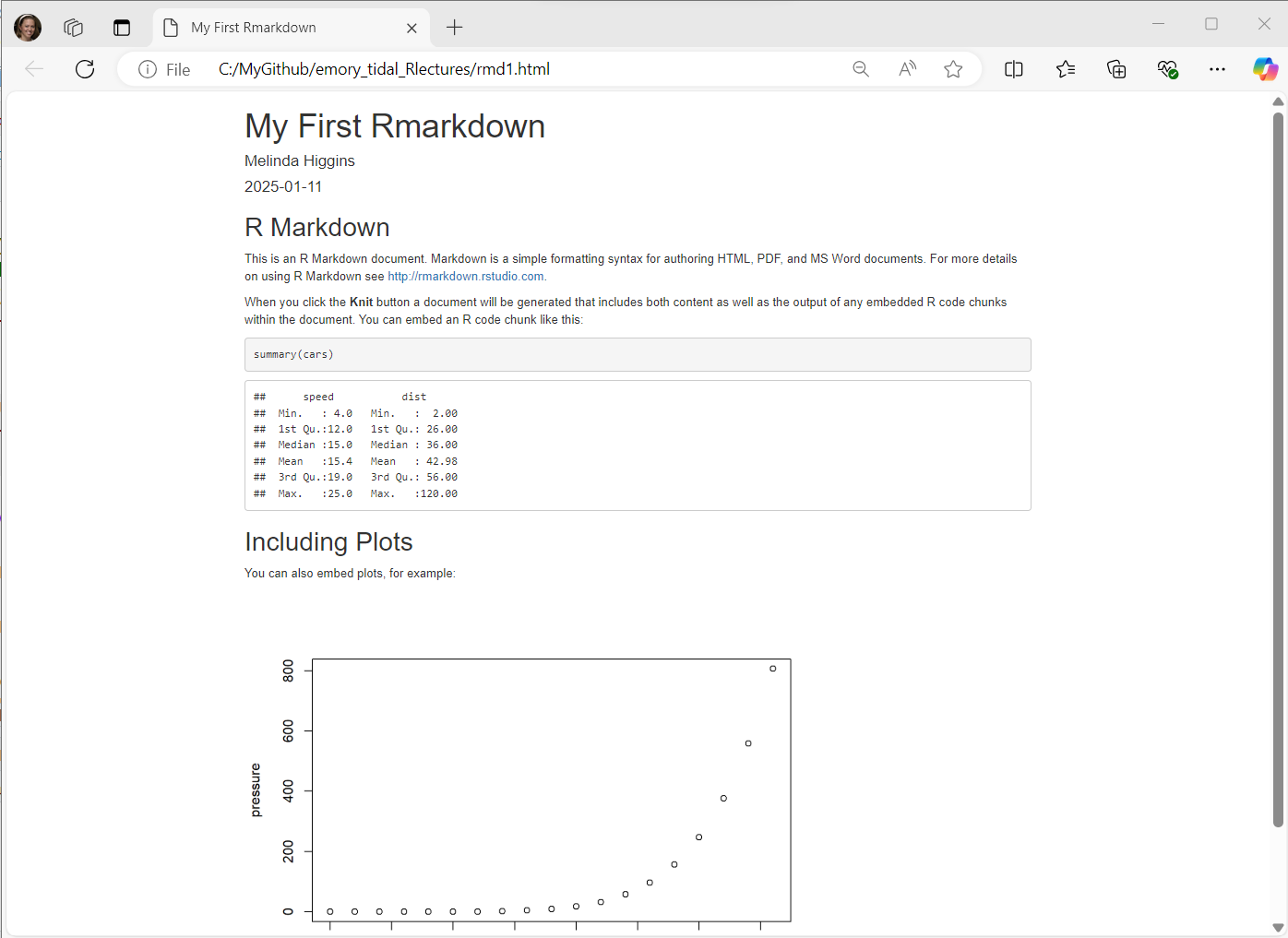
At the top of the page you’ll notice a little blue button that says “knit” - this will “knit” (or combine) the output from the R code chunks and format the text as “marked up” and produce this HTML file (which will open in a browser window):
RMarkdown Example
EXAMPLE 1
- This example will create the PRAMS Report example.
- Download and “knit”
prams_report.Rmd - Also see the complete details in the PRAMS Module - section 7 on Reproducible Research Report.
RMarkdown Code For This Module
References
R Core Team. 2026. R: A Language and Environment for Statistical Computing. Vienna, Austria: R Foundation for Statistical Computing. https://doi.org/10.32614/R.manuals.